
Skill-up colors
Every node, corpse, and recipe has a color that depends on your skill. The gathering professions use the same bands, counted from the skill the node needs.
| Color | Your skill | Skill-up chance |
|---|---|---|
| Orange | Requirement to requirement + 24 | Every gather |
| Yellow | +25 to +49 | Most gathers |
| Green | +50 to +99 | Some gathers |
| Gray | +100 and up | None |
Herbalism
Mageroyal and Briarthorn sometimes drop Swiftthistle as a bonus herb; the Herbalism module logs it with the node it came from.
Tauren Cultivation: cast it on a herb before you pick to grow a duplicate, once an hour. Each herb has a level requirement; ForeverArtisan doesn't guess it, but remembers it the first time a cast fails and shows it on that herb's tooltip.
| Herb | Skill | Orange | Yellow | Green | Gray |
|---|---|---|---|---|---|
| Peacebloom | 1 | 1–25 | 26–50 | 51–100 | 101+ |
| Silverleaf | 1 | 1–25 | 26–50 | 51–100 | 101+ |
| Earthroot | 15 | 15–39 | 40–64 | 65–114 | 115+ |
| Mageroyal | 50 | 50–74 | 75–99 | 100–149 | 150+ |
| Briarthorn | 70 | 70–94 | 95–119 | 120–169 | 170+ |
| Stranglekelp | 85 | 85–109 | 110–134 | 135–184 | 185+ |
| Bruiseweed | 100 | 100–124 | 125–149 | 150–199 | 200+ |
| Wild Steelbloom | 115 | 115–139 | 140–164 | 165–214 | 215+ |
| Grave Moss | 120 | 120–144 | 145–169 | 170–219 | 220+ |
| Kingsblood | 125 | 125–149 | 150–174 | 175–224 | 225+ |
| Liferoot | 150 | 150–174 | 175–199 | 200–249 | 250+ |
| Fadeleaf | 160 | 160–184 | 185–209 | 210–259 | 260+ |
| Goldthorn | 170 | 170–194 | 195–219 | 220–269 | 270+ |
| Khadgar's Whisker | 185 | 185–209 | 210–234 | 235–284 | 285+ |
| Wintersbite | 195 | 195–219 | 220–244 | 245–294 | 295+ |
| Firebloom | 205 | 205–229 | 230–254 | 255–304 | 305+ |
| Purple Lotus | 210 | 210–234 | 235–259 | 260–309 | 310+ |
| Arthas' Tears | 220 | 220–244 | 245–269 | 270–319 | 320+ |
| Sungrass | 230 | 230–254 | 255–279 | 280–329 | 330+ |
| Blindweed | 235 | 235–259 | 260–284 | 285–334 | 335+ |
| Ghost Mushroom | 245 | 245–269 | 270–294 | 295–344 | 345+ |
| Gromsblood | 250 | 250–274 | 275–299 | 300–349 | 350+ |
| Golden Sansam | 260 | 260–284 | 285–309 | 310–359 | 360+ |
| Dreamfoil | 270 | 270–294 | 295–319 | 320–369 | 370+ |
| Mountain Silversage | 280 | 280–304 | 305–329 | 330–379 | 380+ |
| Plaguebloom | 285 | 285–309 | 310–334 | 335–384 | 385+ |
| Icecap | 290 | 290–314 | 315–339 | 340–389 | 390+ |
| Black Lotus | 300 | 300–324 | 325–349 | 350–399 | 400+ |
Mining
Ooze Covered versions of these nodes need the same skill as the normal node.
| Node | Ore | Skill | Orange | Yellow | Green | Gray |
|---|---|---|---|---|---|---|
| Copper Vein | Copper Ore | 1 | 1–25 | 26–50 | 51–100 | 101+ |
| Tin Vein | Tin Ore | 65 | 65–89 | 90–114 | 115–164 | 165+ |
| Incendicite Mineral Vein | Incendicite Ore | 65 | 65–89 | 90–114 | 115–164 | 165+ |
| Silver Vein | Silver Ore | 75 | 75–99 | 100–124 | 125–174 | 175+ |
| Lesser Bloodstone Deposit | Lesser Bloodstone Ore | 75 | 75–99 | 100–124 | 125–174 | 175+ |
| Iron Deposit | Iron Ore | 125 | 125–149 | 150–174 | 175–224 | 225+ |
| Indurium Mineral Vein | Indurium Ore | 150 | 150–174 | 175–199 | 200–249 | 250+ |
| Gold Vein | Gold Ore | 155 | 155–179 | 180–204 | 205–254 | 255+ |
| Mithril Deposit | Mithril Ore | 175 | 175–199 | 200–224 | 225–274 | 275+ |
| Truesilver Deposit | Truesilver Ore | 230 | 230–254 | 255–279 | 280–329 | 330+ |
| Dark Iron Deposit | Dark Iron Ore | 230 | 230–254 | 255–279 | 280–329 | 330+ |
| Small Thorium Vein | Thorium Ore | 245 | 245–269 | 270–294 | 295–344 | 345+ |
| Rich Thorium Vein | Thorium Ore | 275 | 275–299 | 300–324 | 325–374 | 375+ |
Skinning
The skill a corpse needs comes from the mob's level: 1 for levels 1 to 10, (level − 10) × 10 for levels 11 to 20, and level × 5 above 20. Color bands then work the same as the table at the top.
| Mob level | Skill needed | Usual leather |
|---|---|---|
| 10 | 1 | Light Leather, Light Hide |
| 15 | 50 | Light Leather, Light Hide |
| 20 | 100 | Light Leather, Light Hide, Medium Leather, Medium Hide |
| 25 | 125 | Light Leather, Light Hide, Medium Leather, Medium Hide |
| 30 | 150 | Medium Leather, Medium Hide, Heavy Leather, Heavy Hide |
| 35 | 175 | Medium Leather, Medium Hide, Heavy Leather, Heavy Hide |
| 40 | 200 | Heavy Leather, Heavy Hide, Thick Leather, Thick Hide |
| 45 | 225 | Heavy Leather, Heavy Hide, Thick Leather, Thick Hide |
| 50 | 250 | Thick Leather, Thick Hide, Rugged Leather, Rugged Hide |
| 55 | 275 | Thick Leather, Thick Hide, Rugged Leather, Rugged Hide |
| 60 | 300 | Rugged Leather, Rugged Hide |
Cooking
The Forever client reports the skill at which each recipe turns gray. In the recipes we logged during the beta, green started 20 points below gray and yellow 40 points below gray. The Cooking module uses that pattern for its color estimates.
| Recipe | Orange | Yellow | Green | Gray |
|---|---|---|---|---|
| Rockscale Cod | up to 189 | 190–209 | 210–229 | 230 |
| Goblin Deviled Clams | up to 164 | 165–184 | 185–204 | 205 |
Crafting modules: first steps
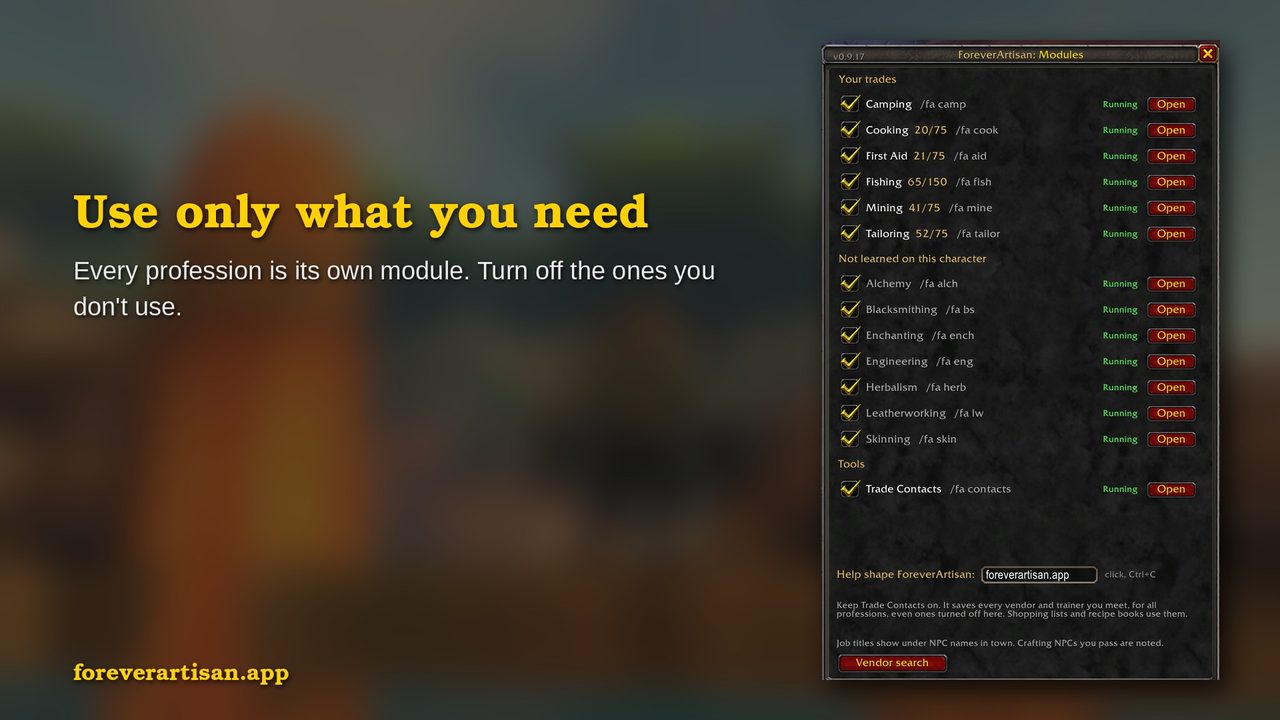
/fa panel.All eight crafting modules (Alchemy, Blacksmithing, Cooking, Enchanting, Engineering, First Aid, Leatherworking, Tailoring) share one window and one plan engine, so these steps work the same in every one.
- Open the profession window once. Until your recipes are read, every tab shows an "Open <profession> window" button. One click opens it and the recipes are read. After that, the Open window button at the top right does the same.
- Not learned yet? "Learn from:" names the closest trainer you've met or passed (marked "seen" if you haven't talked to them), with a Waypoint button.
- Check your tools. A recipe that needs a tool you don't have says "needs Blacksmith Hammer" or "needs Runed Copper Rod" in red, and tools go first on the shopping list. Hover a recipe for where it's made ("Made at: Anvil").
- Find recipes you don't have. The Recipe book lists every recipe, learned first, then "Not learned yet". Each one you don't know is tagged trainer, vendor, drop or quest from your own play. A recipe with no known source says "not found yet": it could be a trainer, vendor, drop or quest you haven't come across. Keep exploring.
- Plan to a target. Type a target skill and the plan lists each craft with a have / need shopping list. Materials you make along the way (Light Leather, cured hides) count toward your skill-ups, and each step shows what it makes.
- Get prices. Open the Auction House, click an item on the shopping list (it types the name in the search box) and press Search. The price shows within a second and is remembered for 30 days. A popular auction addon's scans are used if you have one, never required. ForeverArtisan never searches or buys for you.
- See what pays. The Market tab of the
/fapanel ranks every recipe you know, in every profession, by profit, with 14-day price trends. The Best crafts tab in each crafting window ranks one profession by profit, by the cheapest way to level, or both. One full scan with a popular auction addon prices everything at once; without it, browse the Auction House pages for your materials first. - Visit a trainer once. With Trade Contacts on, open a trainer's list for the profession. The plan can then use recipes you haven't learned yet ("train at 55"), and the shopping list starts with what to train and what it costs.
- Make the window taller. Drag its bottom-right corner to see more of the plan. The size is remembered.
- Alchemy: herbs you're short on point to where your Herbalism log found them. Transmutes stay out of the plan because of their cooldowns.
- Tailoring: bolts of cloth count as crafts, so the plan makes them for you.
- Blacksmithing and Engineering: ore and stone point to your Mining log, and bars say "smelt ore at a forge".
- Enchanting: dust and essences say "disenchant green gear". Works with both the newer and the classic Enchanting window.
- Leatherworking: cured hides count as crafts, so the plan makes only the ones you don't have and lists the raw hides and Salt instead. Leather and hides point to your Skinning log.
FAQ and troubleshooting
Why doesn't it show every drop location?
While ForeverArtisan lists every recipe, where to get each one comes from your own play. It learns from where you've been (the trainers you meet, what you gather, the recipes you find) to help you get where you're going. Want to look further ahead on your journey? Crowdsourced sites have that covered.
My recipes don't show
Open the game's profession window once, or click Open window in the module. The recipes are read when the window opens.
The trainer shows nothing
WoW Forever limits you to two main professions. A trainer for a third asks you to confirm before you learn it.
Mining, Herbalism or Skinning says "0 nodes since your last skill-up"
Fixed in 0.9.11. With auto loot, Forever can skip the loot window, so 0.9.10 never saw what a node gave you. ForeverArtisan now counts it from the "You receive loot" line in chat. Update to the latest version. If Mining still miscounts, /fa mine debug prints what the game reports while you mine; include it with a bug report.
My shopping list says "No prices yet"
Open the Auction House, click an item on the shopping list and press Search. The price shows within a second.
Do I need an auction addon?
No. ForeverArtisan uses an auction addon's scans when one is installed, but never needs one.
Why doesn't my plan include recipe X?
Open a trainer for that profession once (with Trade Contacts on), then reopen the plan. The plan only uses trainer recipes it has seen.
Why does the plan use a yellow recipe instead of an orange one?
It's cheaper per skill point and almost as likely to skill up (within 10%).
The game didn't load ForeverArtisan properly after updating to 0.9.16
0.9.16 adds new files, so the game needs a full restart after updating. /reload isn't enough.
Is the profit on a recipe tooltip or in Best crafts exact?
It's an estimate from the latest prices seen by you or an auction addon, after the Auction House cut (5% at your own, 15% at a goblin house). It doesn't count the deposit, which you only lose if the item doesn't sell. The same goes for Best crafts.
Why did the gold "better at goblin AH" tag disappear?
You're at a goblin Auction House already, so there's nothing to recommend. When your own Auction House pays more, it says so instead.
My controller reel-in doesn't always work
Far casts are past the game's controller reach right now (with the Gamepad UI on, the "X Fishing Bobber" prompt is missing on those). Put the white dot in the middle of the screen on the bobber and press the button, or recast. With the Gamepad UI off there's no dot: point the mouse at it, or recast.
Why can't I equip the fishing pole it suggests?
A yellow line with "usable at 300" means your skill isn't high enough yet. Green "equip it" lines are ready now.
Why is a herb not in my gather log?
The log records herbs you pick while ForeverArtisan runs. Herbs picked before 0.9.11 with auto loot weren't counted. Pick one and it shows up.
I clicked a trainer and got no arrow
The trainer is on another continent. The waypoint is set, and your waypoint addon draws the arrow once you get there.
What changed in the update?
After an update, your first login lists the headline of each release since the one you had (up to three) in chat. New installs get the welcome notice instead. /fa new shows it again any time, and the full list is in the changelog.
I don't see job titles under NPC names
Turn on the game's friendly NPC nameplates: type /fa nameplates, or click "Turn on nameplates" in the /fa panel. If you use a nameplate addon, titles come from that addon; /fa titles on, or the Settings tab of the /fa panel, adds ours anyway.
"Lua error: attempted to index a table that cannot be indexed with secret keys"
Fixed. Forever hides some values from addons: unit names on some nameplates, and buffs, casts and cooldowns in combat. Since 0.9.10 every part of ForeverArtisan skips them quietly and keeps working once they're readable again. /fa version shows how many it skipped this session. Update to the latest version, and if you still see one, tell us at foreverartisan.app/bug.
Something else looks wrong
/fa <profession> debug shows when the profession window was last read and the tools saved per recipe. Include it with a bug report.
Trade Contacts: finding NPCs
Trade Contacts only knows the vendors and trainers you've met. Here's how to meet them faster.
- Turn on friendly NPC nameplates. With them on, NPCs in town show their job under their name, and every crafting vendor and trainer you pass is noted, even before you talk to them. If they're off, the Search tab and the
/fapanel show a "Turn on nameplates" button, or type/fa nameplates. ForeverArtisan never changes your nameplate settings by itself. - Only not visited. Lists the crafting NPCs you've passed but haven't talked to, nearest first. Walk the list and talk to each one.
- Talk to save. Talking to an NPC saves what they sell or teach. A trainer who won't train you yet is still saved, as "visited, no list yet"; their recipes fill in when the trainer window opens.
- Nearest trainer. The button on the Search tab names the closest trainer for your class or a profession. Pick one to see every trainer of that kind you've met, nearest first, with the distance.
- Class trainers. Saved when you pass or talk to them. Pick Trade > Class trainers on the Contacts tab, or search
/fa mage. - Waypoints. Click a contact for a waypoint. It uses a popular waypoint addon's arrow if you have one and the game's map pin if you don't.
Using a nameplate addon? Job titles come from that addon, and Trade Contacts still notes the NPCs you pass. /fa titles on, or the Settings tab of the /fa panel, adds ours anyway.
Fishing ranks
Fishing skill, your pole and your swap weapons are saved per character, so an alt without Fishing shows "not learned yet" (any Fishing trainer teaches it). Your catch log, catch goals, cast marker and key bindings are shared by every character on the account. Catch goals on the Fishing tab count catches since login; the on-screen goals list (/fa goals) counts what you hold in your bags and bank. The weapon swap puts back what you wore before the pole.
| Rank | Skill cap | How to train |
|---|---|---|
| Apprentice | 75 | Any Fishing trainer |
| Journeyman | 150 | Any Fishing trainer, at skill 50 |
| Expert | 225 | Expert Fishing book from Old Man Heming in Booty Bay, 1 gold, at skill 125. Needs character level 20. Confirmed in the Forever beta. |
| Artisan | 300 | Nat Pagle's quest in Dustwallow Marsh at skill 225. Needs character level 35. |
A fishing pole at 0 durability still looks equipped, but the game refuses to cast with "Must have a Fishing Pole equipped." Repair it at any vendor with a Repair option.
Stranglethorn Fishing Extravaganza
The in-game calendar in the Forever beta lists the event on Sundays at 2:00 PM server time. Catch Speckled Tastyfish from the Tastyfish schools along the Stranglethorn coast and turn in 40 to Riggle Bassbait on the Booty Bay docks (27.4, 76.9). The Forever quest text names the first 50 players as Master Anglers; Classic had one winner per server. Jang, next to Riggle, pays coin for extra Tastyfish.
Notes from a level 20 attempt in the beta
- The coast mobs are levels 30 to 45; at the beta's level 20 cap, crossing Stranglethorn on foot means repeated deaths
- The boat from Ratchet docks inside Booty Bay, so you reach the event without touching the jungle
- Pick up the Booty Bay flight point and set your hearthstone with Innkeeper Skindle before the event
- Druids can swim the coast in Aquatic Form; you still need solid ground at the water's edge to cast
- Each death costs your fishing pole durability; swap to your weapons before a risky run
Tool checklist
| Profession | Keep in your bags | Also check |
|---|---|---|
| Mining | Mining Pick (sold for 10 copper by Gagsprocket in Ratchet and several Booty Bay vendors) | Find Minerals is on after a death |
| Herbalism | Nothing | Find Herbs is on after a death |
| Skinning | Skinning Knife | Hover the beast before you pull it |
| Fishing | Pole equipped, lures in bags | Pole durability |
| Cooking | Flint and Tinder and Simple Wood for a Basic Campfire | Open the Cooking window once per character |
| Alchemy | Vials from an Alchemy Supplies vendor | Open the Alchemy window once per character |
| Blacksmithing | Blacksmith Hammer | Recipes needing a tool you lack say "needs …" in red |
| Engineering | The tools your recipes list (shown first on the shopping list) | Open the Engineering window once per character |
| Enchanting | The rod your recipes need (Runed Copper Rod and up) | Disenchant green gear for dust and essences |
| Tailoring | Thread from a Tailoring Supplies vendor | Open the Tailoring window once per character |
| Leatherworking | Salt for curing hides, thread from a Leatherworking Supplies vendor | Open the Leatherworking window once per character |